


What is Loopar?
Loopar is a full-stack meta-framework that enables developers to build complete web applications through a visual drag-and-drop interface, while maintaining full programmatic control when needed. Built on modern technologies like Node.js, React, Vite, and Tailwind CSS, Loopar eliminates the traditional barriers between design and development.
Unlike conventional frameworks that require extensive configuration and boilerplate code, Loopar automates the creation of database models, controllers, views, and API endpoints. You design visually, and Loopar generates production-ready code.
# Get started in seconds
npx loopar-install my-project --port 8080
The installer handles everything automatically. Once executed, you'll see the complete installation process in your console:
Installing Loopar...
✓ Creating project structure
✓ Installing dependencies
✓ Configuring environment
✓ Starting application

Loopar initialized on port: 3000
Continue in your browser to complete installation.
Why Loopar?
The Problem with Traditional Development
Building modern web applications typically requires:
- Setting up complex toolchains (bundlers, transpilers, linters)
- Writing repetitive CRUD operations
- Managing database migrations manually
- Integrating multiple frameworks and libraries
- Maintaining separate codebases for frontend and backend
The Loopar Approach
Loopar provides a unified development experience where:
| Traditional Approach | Loopar Approach |
|---|---|
| Write database schemas manually | Define entities visually, schemas auto-generated |
| Create API endpoints one by one | REST APIs created automatically for each entity |
| Build UI components from scratch | Drag-and-drop interface with 50+ ready components |
| Configure routing manually | Routes auto-generated based on entity structure |
| Separate frontend/backend workflows | Single unified workflow in the browser |
Core Philosophy
Self-Recursive Architecture
Loopar is built on a unique self-recursive architecture. The framework uses itself to build and extend itself. Every component in the system—including the core Entity model—is an entity that can be modified, extended, or replaced through the same visual interface used for application development.
This means:
- Entity creates and manages other entities (including itself)
- Builders (FormBuilder, ControllerBuilder, ViewBuilder) are entities that generate other entities
- The framework can evolve and extend its own capabilities dynamically
Navigate to
desk/entity/listto see how even the core Entity model exists as a self-referential record.
No-Code Meets Full-Code
Loopar doesn't force you to choose between visual development and traditional coding:
- No-Code Mode: Build entire applications using the visual designer—perfect for rapid prototyping, MVPs, or non-technical team members
- Low-Code Mode: Extend visual components with custom logic, hooks, and event handlers
- Full-Code Mode: Write custom React components, server-side logic, and database queries when you need complete control
All three modes work together seamlessly in the same project.
Key Features
Visual Development Environment
- Drag-and-Drop Designer: Build interfaces by dragging components onto a canvas
- Real-Time Preview: See changes instantly as you design
- Component Library: 50+ pre-built components (forms, tables, charts, layouts)
- Responsive Design: Built-in responsive controls for all screen sizes
Automatic Code Generation
- Database Models: Define fields visually, get database models automatically
- REST APIs: Full CRUD endpoints generated for every entity
- Controllers: Server-side logic scaffolded and ready for customization
- Views: React components generated from your visual designs
Multi-Tenant Architecture
- Isolated Databases: Each tenant can have its own database instance
- Shared Codebase: Single deployment serves multiple tenants
- Custom Domains: Each tenant can use their own domain
- Tenant-Specific Configuration: Override settings per tenant
App System
- Modular Applications: Package functionality into installable apps
- App Marketplace: Share and distribute apps within the Loopar ecosystem
- Dependency Management: Apps can depend on and extend other apps
- Version Control: Track and manage app versions
Technology Stack
Loopar leverages modern, battle-tested technologies:
Frontend
| Technology | Purpose |
|---|---|
| React | Component-based UI library |
| Tailwind CSS | Utility-first styling |
| Vite | Lightning-fast build tool |
| Lucide Icons | Beautiful icon library |
Database Support
Loopar supports multiple database engines through its Knex-based data layer:
- MySQL / MariaDB — Recommended for production
- PostgreSQL — Full support for advanced features (JSONB, etc.)
- SQLite — Perfect for development and small deployments
- SQL Server — For Microsoft-based infrastructure
- Oracle — For enterprise Oracle environments
How It Works
The Development Workflow
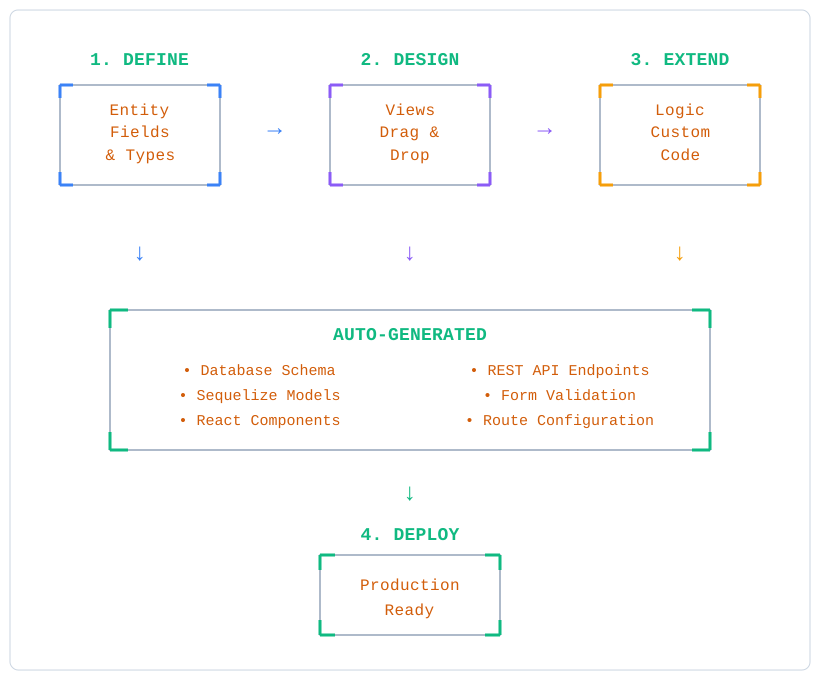
Step-by-Step
- Define Entities: Create data models by specifying fields and their types through the visual interface
- Design Views: Use the drag-and-drop designer to create forms, lists, and pages
- Add Logic: Extend with custom controllers, hooks, and client-side scripts as needed
- Deploy: Your application is production-ready—deploy to any Node.js hosting environment
Who Should Use Loopar?
Ideal For
- Startups needing to build MVPs quickly without sacrificing scalability
- Agencies managing multiple client projects with similar requirements
- Enterprise Teams building internal tools and dashboards
- Solo Developers who want to ship faster without a full team
- Non-Technical Founders who want to prototype before hiring developers
Use Cases
- Content Management Systems — Blogs, portfolios, corporate websites
- Business Applications — CRM, inventory, project management
- SaaS Platforms — Multi-tenant applications with user management
- Internal Tools — Admin panels, dashboards, reporting systems
- E-commerce — Product catalogs, order management, customer portals
Comparison with Alternatives
vs. Traditional Frameworks (Express, Next.js, Django)
| Aspect | Traditional | Loopar |
|---|---|---|
| Initial Setup | Hours of configuration | Minutes with single command |
| CRUD Operations | Manual implementation | Auto-generated |
| Admin Interface | Build from scratch or add library | Built-in Desk interface |
| Learning Curve | Framework-specific patterns | Visual-first approach |
vs. No-Code Platforms (Bubble, Webflow)
| Aspect | No-Code Platforms | Loopar |
|---|---|---|
| Code Access | Limited or none | Full access to generated code |
| Self-Hosting | Usually not possible | Full control over deployment |
| Vendor Lock-in | High | None—it's open source |
| Customization | Platform limitations | Unlimited with custom code |
vs. Frappe/ERPNext
| Aspect | Frappe | Loopar |
|---|---|---|
| Frontend | Custom framework | React + modern stack |
| Learning Curve | Steep, proprietary patterns | Familiar React/Node patterns |
| Performance | Python-based | Node.js with Vite optimization |
| Design System | Bootstrap-based | Tailwind CSS utilities |
Benefits
For Development Teams
- Faster Time-to-Market: Ship features in days instead of weeks
- Reduced Boilerplate: Focus on business logic, not repetitive code
- Consistent Architecture: Enforced patterns prevent technical debt
- Easy Onboarding: New team members can contribute immediately
For Organizations
- Lower Development Costs: Build more with smaller teams
- Better Collaboration: Designers and developers work in the same environment
- Maintainable Codebase: Generated code follows best practices
- Future-Proof: Modern stack ensures long-term viability
For Individual Developers
- Full-Stack Capability: Build complete applications without specialization
- Portfolio Projects: Create impressive projects quickly
- Learning Tool: Understand how full-stack applications work
- Freelance Efficiency: Deliver client projects faster
What's Next?
Ready to start building with Loopar? Here's your path forward:
- Getting Started — Install Loopar and create your first project
- Concepts — Understand the core concepts: Entities, Apps, Builders
- Learn — Step-by-step tutorials for common use cases
Community & Support
- GitHub: github.com/alphabit-technology/loopar
- Issues & Features: Report bugs or request features on GitHub
Loopar is open source and actively maintained. Contributions are welcome!